Third chapter of learning Pyxel, a retro game framework with its engine in Rust (for fluidity) and its API in Python (for simplicity
 This demo progresses in difficulty, with new Python concepts and the risk of getting your character killed.
The demo goes beyond the world of sprites by drawing a line (which fortunately remains pixelated).
Demo
In this demo, a hero explores a dungeon and encounters a beholder. The monster will aim, shoot, while the hero attempts to dodge.
The player will use their keyboard to control the hero.
Assets
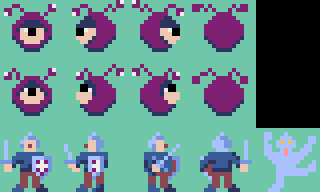
The sprites are organized: by rows, the characters (and their states), by columns, the direction: bottom (front), left, right, top (back).
The warrior has one additional sprite: electrocution.
The Hero Walks Around
The warrior can walk around with the keyboard arrows, turning in the right direction.
Python Concepts
List Comprehension
To create collections (including lists), Python has a condensed syntax.
The following code:
a = [i for i in range(4)]
Is equivalent to:
a = []
for i in range(4):
    a.append(i)
Technically, adding elements to a list is more expensive than the dense syntax.
Demo
A constant, TRANSPARENT
, is used to designate the transparency color, without having to copy it throughout the code and to facilitate readability.
A character has a speed attribute that corresponds to its movement in pixels, each frame.
The images are ordered, the angle attribute simultaneously describes which way the character is looking, and its rank in the image row.
The move method moves the character one step (the speed attribute), in the right direction.
To avoid a slew of ifs, a multiplier is used:
- 0: nothing
- 1: forward
- -1: backward
However, to prevent the character from leaving the screen, a bunch of ifs is needed.
The App class is very classic, the keyboard arrows are used to move (with move) the character in the right direction.
import pyxel

TRANSPARENT = 11


class Hero:
    def __init__(self, x, y):
        self.x = x
        self.y = y
        self.speed = 4
        self.angle = 2
        self._images = [(i * 16, 32, 16, 16, TRANSPARENT) for i in range(4)]

    def move(self, angle: int):
        # 0: don't move
        # 1: move forward
        # -1: move forward
        # angle : ↓←→↑
        self.angle = angle
        self.x += [0, -1, 1, 0][angle] * self.speed
        self.y += [1, 0, 0, -1][angle] * self.speed
        # Can't escape the screen
        if self.x < 0:
            self.x = 0
        elif self.x > pyxel.width - 16:
            self.x = pyxel.width - 16
        if self.y < 0:
            self.y = 0
        elif self.y > pyxel.height - 16:
            self.y = pyxel.height - 16

    def image(self):
        return self._images[self.angle]

    def draw(self):
        pyxel.blt(self.x, self.y, 0, *(self.image()))


class App:
    def __init__(self):
        pyxel.init(160, 120, title="The hero explores")  # width, height, title
        pyxel.load("beholder.pyxres")  # Load the assets
        self.hero = Hero(32, 104)
        pyxel.run(self.update, self.draw)  # Starts Pyxel loop

    def update(self):
        if pyxel.btnp(pyxel.KEY_Q):  # Hit Q to quit
            pyxel.quit()

        if pyxel.btn(pyxel.KEY_DOWN):
            self.hero.move(0)
        if pyxel.btn(pyxel.KEY_LEFT):
            self.hero.move(1)
        if pyxel.btn(pyxel.KEY_RIGHT):
            self.hero.move(2)
        if pyxel.btn(pyxel.KEY_UP):
            self.hero.move(3)

    def draw(self):
        pyxel.cls(13)  # Clear screen
        self.hero.draw()


App()
The Hero Walks in Front of the Beholder Who Follows with Its Gaze
Python Concepts
Class Inheritance
Two characters are described by two classes, and since they have quite a bit in common (they are sprites with a direction).
A class can inherit from another class. The parent class defines attributes and methods, child classes can have their own attributes/methods or override an element of the parent class.
class Parent:
  def hello(self, txt):
    print("hello", txt)

class Child(Parent):
  def hello(self, txt):
    print("wazza", txt)
It’s possible for an overridden method to call the method of an ancestor with the super() function.
class Parent:
    def say(self, txt):
        return "I say " + txt

class Child(Parent):
    def say(self, txt):
        return super().say(txt) + ", or not"
Overriding a method can be mandatory if the parent method raise a NotImplementedError exception.
class Parent:
    def override_me:
      raise NotImplementedError
multiple assignment
Multiple assignement get a condensed syntax too.
a, b = 1, 2
Is equivalent to:
a = 1
b = 2
Typing
Python has typing for its values, but not strong typing: a variable can be reassigned with a value of a different type.
Python uses hints to make the type of a variable explicit. Python maintains backward compatibility: the hints are not taken into account by the interpreter. Typing is intended (among other things) for static analysis (a bot reads and gives its opinion on your code).
Modern editors take typing into account for their suggestions, and to complain (underline in red) about parts of your code that don’t respect the typing.
a :int # a is an integer
Ternary operators
Python get a condensed syntax for value assignement with a condition.
if dx > 0:
    angle = 1
else:
    angle = 2
become:
angle = 1 if dx > 0 else 2
Value 1, if, clause, else, value 2.
Be careful not to overuse dense syntax which can destroy readability.
Demo
The basic behaviors of Hero are now in the Sprite class which will be the parent class of Hero and Beholder.
The Beholder class has a state attribute, and uses 2 rows of images.
state allows knowing which row to use, the direction remains the column as in the previous demo (used in the image method).
The beholder can glare at a target with the watch method.
A bit of math: we calculate the delta between the two characters on the horizontal and vertical axis, dx and dy.
If the horizontal distance is greater than the vertical distance, the beholder looks horizontally. If dx is positive, it looks left, otherwise right.
Same thing for the vertical axis.
In the App class, the update method specifies that the space key activates the LOADING state of the beholder (it looks up), and that it watches the nero.
import pyxel

TRANSPARENT = 11
# Beholder states
LOADING = 0
WAITING = 3


class Sprite:
    def __init__(self, x, y):
        self.x = x
        self.y = y
        self.speed: int
        self.angle: int  # bottom, left, right, top
        self.state: int

    def move(self, angle: int):
        # 0: don't move
        # 1: move forward
        # -1: move forward
        # angle : ↓←→↑
        self.angle = angle
        self.x += [0, -1, 1, 0][angle] * self.speed
        self.y += [1, 0, 0, -1][angle] * self.speed
        # Can't escape the screen
        if self.x < 0:
            self.x = 0
        elif self.x > pyxel.width - 16:
            self.x = pyxel.width - 16
        if self.y < 0:
            self.y = 0
        elif self.y > pyxel.height - 16:
            self.y = pyxel.height - 16

    def image(self) -> tuple[int, int, int, int, int]:
        # What is the current image
        raise NotImplementedError

    def draw(self):
        pyxel.blt(self.x, self.y, 0, *(self.image()))


class Beholder(Sprite):
    def __init__(self, x, y):
        super().__init__(x, y)
        self.angle = 1
        self.speed = 2
        self.state = WAITING
        # The beholder can be normal : waiting, aiming, moving…
        self._main_images = [(i * 16, 0, 16, 16, TRANSPARENT) for i in range(4)]
        # The beholder loads its death ray
        self._loading_images = [(i * 16, 16, 16, 16, TRANSPARENT) for i in range(4)]

    def watch(self, target: Sprite):
        dx, dy = self.x - target.x, self.y - target.y
        if abs(dx) > abs(dy):
            self.angle = 1 if dx > 0 else 2
        else:
            self.angle = 3 if dy > 0 else 0

    def image(self):
        if self.state == LOADING:
            return self._loading_images[self.angle]
        else:
            return self._main_images[self.angle]


class Hero(Sprite):
    def __init__(self, x, y):
        super().__init__(x, y)
        self.speed = 4
        self.angle = 2
        self._images = [(i * 16, 32, 16, 16, TRANSPARENT) for i in range(4)]

    def image(self):
        return self._images[self.angle]


class App:
    def __init__(self):
        # width, height, title
        pyxel.init(160, 120, title="The beholder watch the hero")
        pyxel.load("beholder.pyxres")  # Load the assets
        self.hero = Hero(32, 104)
        self.beholder = Beholder(128, 32)
        pyxel.run(self.update, self.draw)  # Starts Pyxel loop

    def update(self):
        if pyxel.btnp(pyxel.KEY_Q):  # Hit Q to quit
            pyxel.quit()

        if pyxel.btn(pyxel.KEY_DOWN):
            self.hero.move(0)
        if pyxel.btn(pyxel.KEY_LEFT):
            self.hero.move(1)
        if pyxel.btn(pyxel.KEY_RIGHT):
            self.hero.move(2)
        if pyxel.btn(pyxel.KEY_UP):
            self.hero.move(3)

        if pyxel.btn(pyxel.KEY_SPACE):
            self.beholder.state = LOADING
        else:
            self.beholder.state = WAITING
        self.beholder.watch(self.hero)

    def draw(self):
        pyxel.cls(13)  # Clear screen
        self.hero.draw()
        self.beholder.draw()


App()
The Beholder Tries to Strike the Hero with Lightning
Python Concepts
No new python concepts in this chapter, math calculus are boring enough.
Demo
The hero and the monster now have the state attribute which designates (obviously) the state.
The beholder sprites are arranged on two rows:
- The second when it prepares its shot (it looks up)
- The first for the other states (waiting and shooting)
The hero has one more column, the electrocuted state, which has no direction.
All this is handled by the image method.
To give the hero a chance, the beholder aims at the current position of the hero, in the aim method, waits a bit, the time to charge its death ray, then shoots where the hero WAS, the shoot method.
The ray is instantaneous, but it shoots late. If the hero hasn’t moved enough, it dies.
The start and end of the ray are from the center of the sprites, not from the top left corner.
To know if the hero is hit, we don’t just consider its center (hit right in the heart?), but we determine the face of its sprite that faces the beholder. If the ray touches even one of its toes, the character is fried.
The ray is interrupted by the hero, if it touches it, otherwise, it stops at the edge of the screen.
To avoid getting lost in unreadable if statements, a 3x3 grid is used:
- the middle row corresponds to a vertical shot
- the middle column has a horizontal shot
- the center has a shot into its own foot
- the other cells correspond to combinations of left/right, up/down
This is where the heap of math lines begins.
We start by calculating the slope of the shot, then we handle the case where the slope is zero, then we check if the hero is hit laterally, or vertically.
If it’s hit, the ray stops at the point of impact, the hero switches to the ZAPPED state and the ray changes color.
The shot is drawn with Pyxel’s line function.
In the App, no math.
The arrows no longer move the hero when it’s dying.
After 30 frames of pain, the game quits.
The beholder cycles every 40 frames, it aims at frame 10, shoots at frame 30.
import pyxel

TRANSPARENT = 11

# Beholder states
LOADING = 0
FIRING = 1
MOVING = 2
WAITING = 3

# Hero states
HEALTHY = 0
ZAPPED = 1


class Sprite:
    def __init__(self, x, y):
        self.x = x
        self.y = y
        self.speed: int
        self.angle: int  # bottom, left, right, top
        self.state: int

    def move(self, angle: int):
        # 0: don't move
        # 1: move forward
        # -1: move forward
        # angle : ↓←→↑
        self.angle = angle
        self.x += [0, -1, 1, 0][angle] * self.speed
        self.y += [1, 0, 0, -1][angle] * self.speed
        # Can't escape the screen
        if self.x < 0:
            self.x = 0
        elif self.x > pyxel.width - 16:
            self.x = pyxel.width - 16
        if self.y < 0:
            self.y = 0
        elif self.y > pyxel.height - 16:
            self.y = pyxel.height - 16

    def image(self) -> tuple[int, int, int, int, int]:
        # What is the current image
        raise NotImplementedError

    def draw(self):
        pyxel.blt(self.x, self.y, 0, *(self.image()))


class Beholder(Sprite):
    def __init__(self, x, y):
        super().__init__(x, y)
        self.angle = 1
        self.speed = 2
        self.state = WAITING
        # The beholder can be normal : waiting, aiming, moving…
        self._main_images = [(i * 16, 0, 16, 16, TRANSPARENT) for i in range(4)]
        # The beholder loads its death ray
        self._loading_images = [(i * 16, 16, 16, 16, TRANSPARENT) for i in range(4)]
        # Where the beholder aims
        self._aim_dx: int
        self._aim_dy: int

    def image(self):
        if self.state == LOADING:
            return self._loading_images[self.angle]
        else:
            return self._main_images[self.angle]

    def watch(self, target: Sprite):
        dx, dy = self.x - target.x, self.y - target.y
        if abs(dx) > abs(dy):
            self.angle = 1 if dx > 0 else 2
        else:
            self.angle = 3 if dy > 0 else 0

    def aim(self, target: Sprite):
        self.state = LOADING
        self._aim_dx, self._aim_dy = self.x - target.x, self.y - target.y

    def shoot(self, target: Sprite):
        self.state = FIRING
        # The ray starts avec self.x, self.y
        x_end: float  # horizontal end of the ray
        y_end: float  # vertical end of the ray

        # Center of the shooter
        shooter_x, shooter_y = self.x + 8, self.y + 8
        # Center of the target
        target_x, target_y = target.x + 8, target.y + 8
        # Side hit by the shot
        target_side_x = target_x + pyxel.sgn(self._aim_dx) * 8
        target_side_y = target_y + pyxel.sgn(self._aim_dy) * 8

        # Where the ray ends when it misses ?

        cross = [  # x, y
            [(pyxel.width, pyxel.height), (pyxel.width, shooter_y), (pyxel.width, 0)],
            [(shooter_x, pyxel.height), (None, None), (shooter_x, 0)],
            [(0, pyxel.height), (0, shooter_y), (0, 0)],
        ]
        x_end, y_end = cross[pyxel.sgn(self._aim_dx) + 1][pyxel.sgn(self._aim_dy) + 1]

        if x_end is None:  # It shoots its own foot
            return

        x_hit, y_hit = shooter_x, shooter_y
        if self._aim_dx != 0:
            slope = self._aim_dy / self._aim_dx
            y_end = (x_end - shooter_x) * slope + shooter_y
            y_hit = (target_side_x - shooter_x) * slope + shooter_y
            if slope != 0:
                x_end = (y_end - shooter_y) / slope + shooter_x
                x_hit = (target_side_y - shooter_y) / slope + shooter_x
        if abs(target_x - x_hit) <= 8:
            x_end, y_end = x_hit, target_side_y
            target.state = ZAPPED
        if abs(target_y - y_hit) <= 8:
            x_end, y_end = target_side_x, y_hit
            target.state = ZAPPED
        bolt_color = 10 if target.state == ZAPPED else 6
        pyxel.line(shooter_x, shooter_y, x_end, y_end, bolt_color)


class Hero(Sprite):
    def __init__(self, x, y):
        super().__init__(x, y)
        self.speed = 4
        self.angle = 2
        self._images = [(i * 16, 32, 16, 16, TRANSPARENT) for i in range(4)]
        self._zapped_images = [
            (64, 32, 16, 16, TRANSPARENT),
            (64, 32, -16, 16, TRANSPARENT),
        ]
        self.state = HEALTHY

    def image(self):
        if self.state == HEALTHY:
            return self._images[self.angle]
        elif self.state == ZAPPED:
            return self._zapped_images[pyxel.frame_count % 2]


class App:
    def __init__(self):
        # width, height, title
        pyxel.init(160, 120, title="The beholder and its beam of death")
        pyxel.load("beholder.pyxres")  # Load the assets
        self.hero = Hero(32, 104)
        self.beholder = Beholder(128, 32)
        self.game_over = 0
        pyxel.run(self.update, self.draw)  # Starts Pyxel loop

    def update(self):
        if pyxel.btnp(pyxel.KEY_Q):  # Hit Q to quit
            pyxel.quit()

        if self.hero.state == ZAPPED:  # Everything is frozen when the hero is zapped
            if self.game_over == 0:
                self.game_over = pyxel.frame_count
            else:
                if pyxel.frame_count - self.game_over == 30:
                    pyxel.quit()
        else:
            if pyxel.btn(pyxel.KEY_DOWN):
                self.hero.move(0)
            if pyxel.btn(pyxel.KEY_LEFT):
                self.hero.move(1)
            if pyxel.btn(pyxel.KEY_RIGHT):
                self.hero.move(2)
            if pyxel.btn(pyxel.KEY_UP):
                self.hero.move(3)

            self.beholder.watch(self.hero)
            if pyxel.frame_count % 40 == 10:  # Every 50 frames, the beholder aims
                self.beholder.aim(self.hero)
            if pyxel.frame_count % 40 == 30:  # 25 later, it shoots
                self.beholder.state = FIRING

    def draw(self):
        pyxel.cls(13)  # Clear screen
        self.hero.draw()
        if self.beholder.state == FIRING:
            self.beholder.shoot(self.hero)
        self.beholder.draw()
        if self.hero.state == ZAPPED:
            pyxel.text(60, 10, "GAME OVER", 7, None)


App()
The sources of Beholder are available on Github.
You can test the online version of Beholder Demo Online
What’s Next
The shot kills the hero in one hit, we could use a health bar system that decreases with each shot, as well as a loading bar for the beholder’s shot preparation.
The hero cannot retaliate, what injustice. There would need to be sprites with a sword that strikes (a forward lunge?), with a (short) waiting time during an attack that prevents it from moving.
A HUUUUUUM sound during charging, then ZAAAAP during shooting, a GZZZZZ during electrocution seems essential to me.